Cinema Pass
This project is from the prototyping class. We interview our classmates to find what problem they face, then go through the design process to design a solution.

2022
My Work
-
UX design: Interview, empathy map, user story, persona, storyboard
-
UI design: Lo-fi prototype, Hi-fi prototype
Work Process
Empathy Map
We do a short interview in the class, recording the audio and taking notes. Based on the interview result, we make an empathy map.

User story
We use the typical template to find out what is user’s needs.
-
As a cinema audience, I want to get the information about the movie in cinemas,
so that I don’t have to search for the information by myself. -
As a cinema audience, I want to have a better flow of checking my Covid certificate,
so that I don’t have to be flustered. -
As a cinema audience, I want to be able to book tickets on my phone easier,
so that I can do it everywhere.
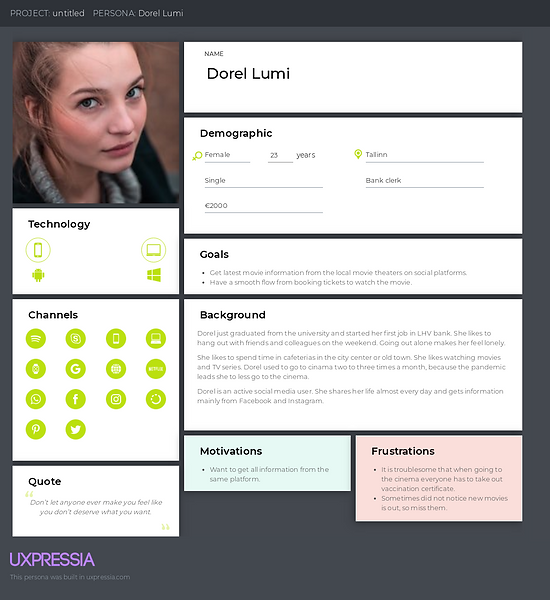
Persona
With the user stories, we create personas to help draft design assumptions.
Storyboard
We depict a key part of the user’s interaction with the application. The storyboard is also used for showing another classmate to understand the scenario.


ChatBot
The user interface is a medium between users and products. It is like communicating through UI. Hence, we work in a pair to simulate the user and the service. The persona, user stories, and storyboard are used to introduce our partners to the context.
I split the dialogue into different sections. Each section includes a finished interaction, which is usually a feature in the product.
Lo-fi Prototype
Based on the dialogue, I draw the paper prototype. Then using Wizard of Oz to test the prototype with classmates. The observer will record the problems the user meet during the test.

Heuristics Checklist
We use a usability checklist with 25 questions to evaluate our prototypes.
Here are the points that I should consider.
-
The icons can be added to help users to understand
-
When users cancel the order, confirm with users
-
Record users' frequent settings and suggest the options
-
Error handling needs to be considered

Hi-fi Prototype
I make the interface similar to Native Apps. Also, add a few animation effects.

Results &Takeaways
Most steps in this design process are frequently used in other projects. The most impressive thing is using the dialogue to play the role with other classmates. The users may do some interaction that I did not think about. Besides, we even do not need to prepare any prototype in this phase. It is an effective method that I will take into account in my future design process.
Regards the UI design and prototyping, this time I try to follow iOS design guidelines. It is not easier than building my design system. I had to refer back to many apps on my phone. Going through this project, I have a better understanding of iOS design guidelines, and also discover the UI details that I was not aware of before.